Product Design & Material Choices

Based on our value-chain assessment, product energy use, materials and end-of-life are key focus areas. We integrate selected energy, material and compliance requirements into product development and packaging decisions.

Design for Energy Efficiency, Repairability and Material Use
We apply product design requirements related to energy efficiency, repairability and material information. We support repair and maintenance where spare parts and service routes are available.

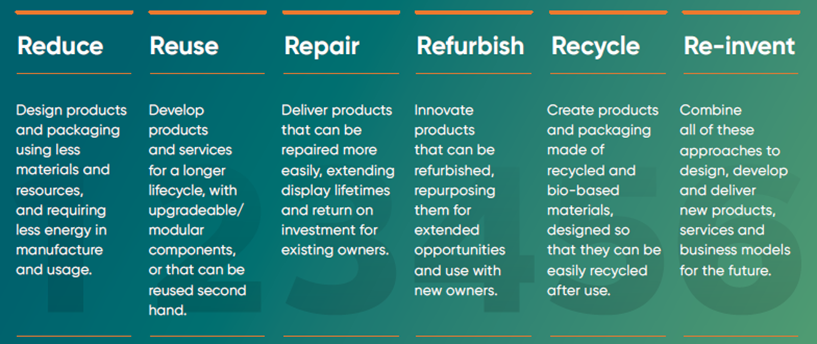
We distinguish six principles that help to reduce packaging volume”, “increase recycled plastic content”, “improve energy label performance” where evidenced.
(see Figure 1)

Materials & Packaging
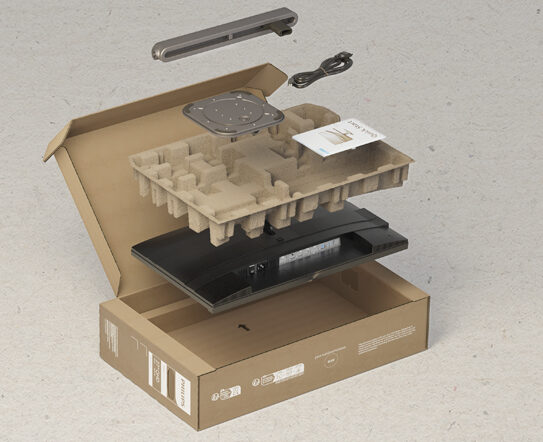
Selected models use packaging designed with recyclable materials and FSC-certified paper-based components. Recyclability depends on local facilities. In 2024, 13% more monitor models qualified as sustainable compared to the previous year, reflecting our ongoing progress in responsible innovation.

Models 24B2G5200 and 27B2G5500
These models include energy-saving features and published energy consumption data in their EU energy label documentation:

  • Energy-efficient operation
    Equipped with PowerSensor and LightSensor technology, they reduce power usage by up to 80%, adapting to user presence and ambient lighting. A 0-watt hard switch ensures zero energy consumption when turned off.
  • Sustainable materials
    Both models use 85% post-consumer recycled (PCR) plastics and 5% ocean-bound plastic, and are packaged in 100% recyclable, FSC-certified materials.
  • Certified green
    Rated TCO Certified 9.0 & TCO Certified 10 and EPEAT Gold, these monitors meet leading environmental standards.
  • User-friendly design
    Featuring LowBlue Mode to support user eye comfort and well-being.

🔗 Discover our full range of low impact monitors

Tools & Transparency
To empower customers in making more sustainable choices, we provide:

A Product Carbon Footprint (PCF) Information Sheet for each monitor (where available), showing the estimated carbon emissions across its life cycle. These are listed in the table below, with direct links to each PCF. (see Table 1)
A Sustainability Calculator to estimate energy savings and emissions reductions.

A Product Carbon Footprint (PCF) Information Sheet for each monitor (where available), showing the estimated carbon emissions across its life cycle. These are listed in the table below, with direct links to each PCF. (see Table 1)

Figure 1. The six principles for minimizing resource use and reducing landfill: Reduce, Reuse, Repair, Refurbish, Recycle, and Re-invent. Applied where technically and commercially feasible; model-level details vary.

Model-level documentation provides product-specific repair, energy and material information:

Model NumberModel NameLink to Product Carbon Footprint (PCF) Information Sheet
27B2G5500LCD Monitorhttps://www.documents.philips.com/assets/20241223/20265c78d6fa4c0b830cb24f00837026.pdf
27B2G5200LCD Monitorhttps://www.documents.philips.com/assets/20241223/ad020fa6876b4b6caf05b24f00837061.pdf
27B2G5601LCD Monitorhttps://www.documents.philips.com/assets/20241223/08f92d4d341e4514b77bb24f008371ca.pdf
24B2G5200LCD Monitorhttps://www.documents.philips.com/assets/20241223/9b294687d8ee4501abceb24f00836ba6.pdf
24B2G5301LCD Monitorhttps://www.documents.philips.com/assets/20241223/178109e8dbe441c2a283b24f00836ceb.pdf
27B1U3900LCD Monitorhttps://www.documents.philips.com/assets/20241223/afdf7000e155459996bbb24f00836e67.pdf
45B1U6900CHLCD monitorhttps://www.documents.philips.com/assets/20240206/afbb915a9f5b4b678331b10e00b20748.pdf
24B1U5301HLCD monitor with USB-C dockinghttps://www.documents.philips.com/assets/20240206/fb0f2971e73644e7a480b10e012639b4.pdf
34B2U6603CHCurved Business monitorhttps://www.documents.philips.com/assets/20241015/0ef7b0be5f9e4215a697b20a005c0719.pdf
273S1LCD Monitor with USB-C dockinghttps://www.documents.philips.com/assets/20240207/b40e2eb4322241179622b10f0056eb73.pdf
498P9Super Wide curved LCD Monitorhttps://www.documents.philips.com/assets/20230606/be0ccc12b31c4be785e4b0190110248a.pdf
328P6AUBREBLCD monitor with USB-C Dockhttps://www.documents.philips.com/assets/20240207/778130dfe35f48c99bc1b10f00e3f0de.pdf
272B8QQHD LCD monitorhttps://www.documents.philips.com/assets/20230601/bc5eea3f02e24421944fb01400f2fdf4.pdf
243B9HLCD monitor with USB-Chttps://www.documents.philips.com/assets/20240207/633216bcc7e849b18067b10f00b4794c.pdf
241B7QUBHEBLCD monitor with USB-C dockinghttps://www.documents.philips.com/assets/20240206/4fc297a752f548c39817b10e00b62f90.pdf
19S4QABLED-backlit LCD monitorhttps://www.documents.philips.com/assets/20240208/9cd9e6c7559a4f1597bab11000c4089d.pdf
276B9HLCD monitor with USB-Chttps://www.documents.philips.com/assets/20240207/e5bdc0cb7e104f32b07cb10f0058468f.pdf
275S9JALLCD monitorhttps://www.documents.philips.com/assets/20240209/5f52dd4643d24e11a28bb111004f660a.pdf
272S9JALLCD monitorhttps://www.documents.philips.com/assets/20240208/4c125e1c18244bf2b9c3b110008b9149.pdf
16B1P3302Portable Monitorhttps://www.documents.philips.com/assets/20240206/302715503a2247579e68b10e00e72ce1.pdf
16B1P3302DPortable Monitorhttps://www.documents.philips.com/assets/20240206/20f485fd69224c84b112b10e0124c4ce.pdf
24B1U5301HLCD monitor with USB-C dockinghttps://www.documents.philips.com/assets/20240206/fb0f2971e73644e7a480b10e012639b4.pdf
27B1U5601HLCD monitor with USB-C dockinghttps://www.documents.philips.com/assets/20240208/48c57b37a1dc47459ae7b11000e944cd.pdf
34B1U5600CHCurved Ultra Wide display with USB-C dockhttps://www.documents.philips.com/assets/20240206/87ca6c87dad74eaba4bfb10e00b21974.pdf
40B1U5600UltraWide LCD monitor with USB-Chttps://www.documents.philips.com/assets/20240207/b3f1f8857106496bbfeab10f00b49cb9.pdf
40B1U5601HUltraWide LCD monitor with USB-C dockinghttps://www.documents.philips.com/assets/20240206/e5272e0143574e0083cfb10e0121c14e.pdf
40B1U6903CH5K2K UltraWide Thunderbolt™ monitorhttps://www.documents.philips.com/assets/20240208/7f1ccd096e754265bc02b110012221c2.pdf
45B1U6900CLCD monitorhttps://www.documents.philips.com/assets/20240206/afbb915a9f5b4b678331b10e00b20748.pdf
49B2U5900CHCurved Business Monitorhttps://www.documents.philips.com/assets/20240208/1fed24fcac5d443ca688b1100089d50e.pdf
49B2U6900CHCurved Business Monitorhttps://www.documents.philips.com/assets/20240207/976855763cd74dd4bfd5b10f011d6c8c.pdf
49B2U6903CHCurved Business Monitorhttps://www.documents.philips.com/assets/20240619/98f88719c0d54530a43bb19400b09dd8.pdf
162B9TLCD monitor with SmoothTouchhttps://www.documents.philips.com/assets/20240207/f0041dc7bf7447f38a09b10f00b2ab99.pdf
221B8LHEBLCD monitorhttps://www.documents.philips.com/assets/20240207/a05fd94dc0b946079371b10f012112ac.pdf
221B8LJEBLCD monitorhttps://www.documents.philips.com/assets/20240206/97bb139edff54d61bd21b10e012614cb.pdf
222B9TLCD monitor with SmoothTouchhttps://www.documents.philips.com/assets/20240208/be112b421e8f4443a664b110005604a9.pdf
222S9JMLLCD monitorhttps://www.documents.philips.com/assets/20240312/96bb83a5a3be443e9ddfb13100657e5f.pdf
230B8QJEBLCD monitorhttps://www.documents.philips.com/assets/20240208/beafaa96014f4b4399fab110005a198c.pdf
242B9TLCD monitor with SmoothTouchhttps://www.documents.philips.com/assets/20240207/e1e42a8ab23e405f837bb10f00546549.pdf
242S9ALLCD monitorhttps://www.documents.philips.com/assets/20230607/706b47784b044dd4b98bb01a0098b9b7.pdf
242S9JALLCD monitorhttps://www.documents.philips.com/assets/20230602/d4a810b6d1a24a9aa399b01500f9283e.pdf
242S9JMLLCD monitorhttps://www.documents.philips.com/assets/20230614/74bcb5e451cd4e4eaa69b0210058cf79.pdf
243S1LCD monitor with USB-C Dockhttps://www.documents.philips.com/assets/20230614/ac6483cbbf1a4ae7a6c1b02100be6fe3.pdf
243S7EHMBLCD monitorhttps://www.documents.philips.com/assets/20240208/37261da87a6d49a2a6d1b1100121221e.pdf
243V7QDABLCD monitorhttps://www.documents.philips.com/assets/20240207/8aec1d40f5f54350a12cb10f0081c4c2.pdf
243V7QDSBLCD monitorhttps://www.documents.philips.com/assets/20240207/922ce2be8ed24a468587b10f0121b43f.pdf
243V7QJABFLCD monitorhttps://www.documents.philips.com/assets/20240208/63e68c63cc3c47cb926db110008aac5b.pdf
272S1MLCD monitorhttps://www.documents.philips.com/assets/20230601/5216924f60fa4555a78bb01400c5e91d.pdf
272S1MHLCD monitor with Windows Hello Webcamhttps://www.documents.philips.com/assets/20240206/d271bc5cc0dc4f69bb89b10e0125a311.pdf
275S9JMLLCD monitorhttps://www.documents.philips.com/assets/20240207/f847c99f0b1d4847a2f2b10f00835b9b.pdf
326P1HLCD monitorhttps://www.documents.philips.com/assets/20230613/e7b40fa2cfbe44f4a0a3b020005f234e.pdf
499P9HLCD monitorhttps://www.documents.philips.com/assets/20240209/9ecf85d779f146e89195b11100503aba.pdf
Table 1. Product Carbon Footprint (PCF) Information Sheet.

More on corporate
social responsibility

ESG Strategy
ESG Strategy
Environment
Environment
Product Design & Material Choices
People
People
Responsible Supply Chain
TPV Cares
TPV Cares
ESG Governance
ESG Governance
Certifications & Recognitions
Reports and Policies